
Metro Transit
Metropolitan Council - OldTravel & Local
3.1544.00 Reviews
- Version
- 4.11.0
- Installs
- 100.00K
- Age Rating
- Everyone
Screenshots
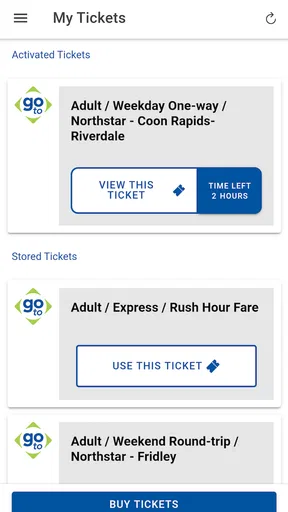
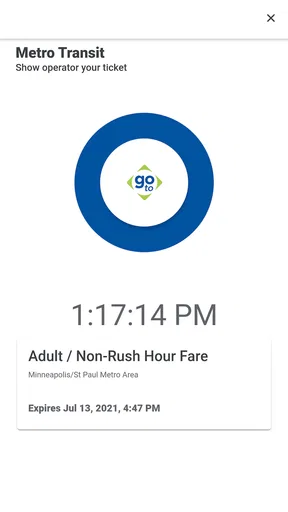
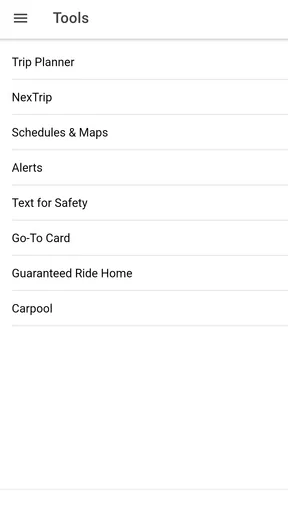
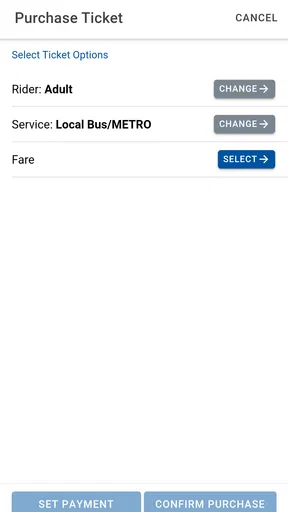
Our Review of Metro Transit
 Analysis by Appyee
Metro Transit is the kind of app I would install before relying on public transport for a busy day, especially when the main task is buying a mobile ticket rather than planning every detail of a journey. Developed by Metropolitan Council - Old, it sits in the Travel & Local category and is free to use. I found its purpose easy to understand: it puts Metro Transit ticketing on the phone, so there is less need to stop at a machine or handle a paper ticket before boarding.
That focused purpose is both its strength and its limitation. I would recommend it to regular riders who already know which service they need and want a convenient way to manage fares. I would be more cautious about recommending it as a complete travel companion for someone who needs extensive step-by-step guidance, highly detailed accessibility information, or a single tool for every part of a complicated trip.
How the app feels to use when clarity matters
On first opening Metro Transit, the most important question is answered quickly: this is a ticketing tool for Metro Transit, not a general-purpose travel marketplace. That clear identity helps reduce confusion for people who simply want to get a fare ready. The interface is easier to approach when I already know my route, because I can concentrate on the ticket task instead of sorting through unrelated travel content.
For readability, the app benefits from keeping its central job narrow. A rider who is familiar with Metro Transit services should be able to understand why the app is useful without learning a complicated system first. The wording is likely to feel most comfortable to people who recognize the transit network and its fare choices. Someone visiting the area for the first time may need more time to decide which ticket is appropriate, particularly if they are unsure about zones, service types, or when a ticket should be activated.
I would avoid treating the app as something to explore casually while rushing toward a vehicle. My preferred workflow is to open it before leaving, sign in or complete any required setup calmly, and prepare the intended ticket while I still have time to read each option. That small change makes a meaningful difference for older riders, people with reading difficulties, and anyone using a phone in an unfamiliar environment.
The current version is 4.11.0, and the app requires Android 6.0 or later. That minimum requirement makes it usable on a broad range of Android phones, although the experience will naturally depend on the handset, display, operating system settings, and the rider’s comfort with mobile payments or ticketing screens. The app is rated for Everyone, which fits its practical role, but an age rating should not be confused with a guarantee that every interaction will suit every ability.
Navigation that works best with preparation
My main navigation advice is to separate route planning from ticket purchase. If I am deciding between several ways to travel, I would use a map or transit-planning tool first, then open Metro Transit when I know what fare I want. This avoids forcing a ticketing screen to carry the burden of trip research.
That division is especially helpful for people who use screen magnification, larger text, or voice assistance. Enlarging text can make reading safer, but it may also cause more scrolling or make controls less visible at once. A short, deliberate sequence is easier to manage than repeatedly moving between route details and payment decisions. I would also keep the phone’s display awake during the final part of the process and check the ticket status before approaching the boarding area.
One non-obvious trade-off is that convenience can create a new point of failure. A paper ticket or a ticket bought at a staffed location is visible in the hand; a mobile ticket depends on the phone being usable at the right moment. I would therefore avoid waiting until the last second, particularly if I am traveling with someone who needs extra time, has limited dexterity, or becomes uncomfortable when a queue is watching.
Different abilities and the physical act of ticketing
Mobile ticketing can remove some physical barriers. A rider who finds ticket machines difficult to reach, read, or operate may prefer completing the purchase on a personal phone in a familiar position. Someone with limited standing tolerance can prepare before arriving at a stop. A person who finds crowded public spaces overwhelming may also appreciate reducing the amount of time spent searching for a machine.
At the same time, the app does not remove every physical demand. The user still needs to hold or position a phone, tap controls accurately, read the result, and present the screen when required. People with tremors, reduced fine-motor control, or one-handed use may find small controls and timed interactions tiring. I would use the largest comfortable touch targets available through the phone’s settings and avoid operating the app while walking.
For users with low vision, screen-reader support and contrast settings can make a major difference, but the practical experience depends on how the app labels controls and presents changing ticket information. I would test the complete journey at home rather than assuming that phone accessibility settings alone will solve everything. The crucial test is not merely whether the app opens; it is whether I can select the correct fare, complete the transaction, locate the active ticket, and show it without assistance.
Users with hearing loss may find a visual ticket easier than relying on spoken announcements, but the app cannot replace clear awareness of service changes, platform information, or boarding instructions. A person with cognitive disabilities may benefit from a simple routine: one route, one ticket choice, and a written note explaining what to tap. A trusted companion could help with the initial setup while leaving the rider in control of the phone afterward.
Using it in real situations, not ideal ones
Imagine I am leaving work during a crowded evening period. I know which Metro Transit service I need, but I do not want to stand at a machine while carrying a bag. Buying the ticket on my phone before reaching the stop is a genuine improvement. I can check the screen in a quieter place, confirm the fare, and approach boarding with less pressure.
Now change the situation: I am traveling with a child, carrying luggage, and helping a companion who cannot easily read a small screen. The same app may still be useful, but I would prepare earlier and keep the phone accessible. I would not bury it at the bottom of a bag or rely on a nearly empty battery. The ticketing benefit is real, yet the surrounding travel plan needs to account for the phone as an essential travel item.
For a visitor, the app is most comfortable when paired with another source of route information. A map app may be better for comparing walking directions, transfers, and arrival times, while Metro Transit is the more direct place to handle its mobile fare. Using both can feel less elegant than having one all-in-one application, but it is often clearer than expecting a ticketing app to answer every travel question.
For a daily rider, the value is different. Repeated use can make the ticket routine familiar, and the free price removes a financial barrier to trying it. Still, I would not assume that mobile purchasing is automatically faster for every person. Riders who already have a reliable physical fare method may prefer that option when their phone is old, their battery is unreliable, or they dislike handling payment information on a small screen.
Where the experience can become difficult
The biggest remaining barrier is dependence on a working phone at the exact time of inspection or boarding. A cracked display, low battery, poor visibility, gloves, wet conditions, or a phone that is temporarily locked can turn a simple ticket into a stressful problem. I would charge the device before leaving and keep the relevant screen easy to reach. That is ordinary advice, but it matters more here because the app is tied to access to the fare itself.
Connectivity and account-related interruptions can also be frustrating in a station or stop where the signal is weak. I would complete the purchase before arriving whenever possible, then verify that the ticket is available rather than assuming a successful tap means everything is ready. If another person is helping a rider, the helper should make sure the ticket can be displayed independently of a complicated conversation at the point of boarding.
Another limitation is that ticketing clarity does not automatically equal journey clarity. A rider may successfully obtain a fare and still be unsure where to go, whether a transfer is suitable, or how to respond to a disruption. People who need detailed step-free routing, elevator information, quiet travel options, or precise assistance planning should investigate those matters separately before setting out. I would especially avoid using this app alone for a first trip in an unfamiliar area.
The average rating is 3.1 from around 1.1 thousand ratings, with roughly 544 written reviews. I read that as a sign to keep expectations practical rather than assuming the experience is effortless for everyone. The app has passed the threshold of broad everyday use, with more than 100 thousand installs, but popularity does not erase the personal factors that affect mobile ticketing: vision, dexterity, confidence, connectivity, battery life, and familiarity with the transit system.
Who should use it and who should choose another approach
I think Metro Transit is a good match for riders who already understand the network, want a free official ticketing option, and are comfortable preparing a fare on a phone. It is also useful for people who find physical ticket machines inconvenient or inaccessible in practice. A regular commuter can build a predictable routine around it, while an occasional rider can use it successfully with a little preparation.
I would suggest a different primary approach for someone who needs extensive itinerary planning, detailed accessibility coordination, or dependable assistance from a person at the point of purchase. A transit-planning app, a staffed sales channel, or a physical fare method may be better depending on the situation. That is not a failure of this app; it reflects its narrower job.
Families should decide whether one phone is practical for several riders. If the group is moving quickly, switching between tickets or asking one person to display everything may create confusion. I would prepare the required fares before reaching the vehicle and keep each ticket clearly identifiable. Travelers with support workers or companions should agree in advance who will handle the phone, who will confirm the route, and who will communicate if something goes wrong.
My inclusive verdict after using it as a travel tool
Metro Transit makes the most sense when I treat it as a focused mobile ticketing app rather than a complete accessibility or journey-management solution. Its free access, official purpose, broad Android compatibility, and straightforward ticketing role can remove meaningful obstacles for many riders. The ability to prepare away from a machine is particularly valuable for people who need more time, a familiar screen, or a quieter setting.
Its inclusive value is strongest when the rider plans ahead. Check the route separately, choose the fare before the rush, confirm that the ticket is ready, charge the phone, and make sure the display and touch settings are comfortable. Those steps are not glamorous, but they turn a fragile last-minute action into a manageable routine.
I would recommend trying it at home before depending on it for an important appointment. If the complete sequence feels readable and physically comfortable, it can be a practical addition to regular Metro Transit travel. If the phone becomes a barrier rather than a convenience, a different fare method or human-assisted option is likely the better choice. The app is most inclusive when it supports a prepared journey, not when it is expected to solve every travel challenge on its own.
Overall, I see it as a useful, purpose-built option for riders who want Metro Transit tickets on their phone. It will not suit every ability or every context, but it can make the fare-purchasing part of a trip noticeably easier. For me, that focused usefulness is enough to recommend it—provided the rider tests the workflow, keeps a backup plan, and chooses the tool that matches the kind of support they actually need.
Verdict
Strengths of Metro Transit
- Real-time arrival updates help reduce waiting at stops.
- Trip planning covers buses, trains, and transfers in one app.
- Service alerts make delays, closures, and route changes easier to track.
- Nearby stop searches are useful when traveling in unfamiliar areas.
- Saved routes and stops provide quick access to frequent journeys.
Limitations of Metro Transit
- Coverage and features depend on the transit agency and service area.
- Arrival predictions may be inaccurate during disruptions or heavy traffic.
- The interface can feel crowded when several routes serve one stop.
- Some information may require an active internet or location connection.
- Ticketing and payment options may not be available for every service.
Similar Picks in This Category
View All
Google Maps
Google LLC3.4

Google Maps Go
Google LLC4.1

Booking.com: Hotels & Travel
Booking.com Hotels & Vacation Rentals4.8

Google Earth
Google LLC3.8

Skyscanner Flights Hotels Cars
Skyscanner Ltd4.8

trivago: Compare hotel prices
trivago N.V.4.4
Frequently Asked Questions
What is Metro Transit, and what can I use it for?
Metro Transit is a public transportation companion app designed to help riders plan and manage trips using buses, trains, and other services operated by participating Metro Transit systems. It can typically provide route planning, stop and station information, schedules, real-time arrival predictions, service alerts, and nearby transit options. Available features may vary depending on your city and the local transit agency supported by the app.
Does Metro Transit provide accurate real-time arrival information?
Metro Transit can display scheduled departures as well as live vehicle predictions when real-time data is available from the transit agency. In my experience, these estimates are useful for checking whether a bus or train is approaching, but they should not be treated as exact guarantees. Traffic, weather, maintenance, vehicle issues, and data delays can affect arrival times, so it is wise to allow extra time for important journeys.
Can I plan a complete trip with Metro Transit?
Yes, the app is intended to help users plan journeys by entering a starting point, destination, and preferred departure or arrival time. Depending on the supported network, it may suggest combinations of walking, buses, trains, transfers, and other public transportation options. Before starting a trip, review the suggested route, transfer locations, walking directions, and service alerts because schedules and operating conditions can change.
Does Metro Transit support mobile tickets or fare payments?
Fare and ticketing support depends on the specific Metro Transit system and the version of the app available in your region. Some users may be able to purchase mobile tickets, view passes, or access payment-related services, while others may only receive schedules and trip-planning tools. Check the app’s fare section and your local agency’s requirements before relying on it as your only way to pay.
Does Metro Transit require an internet connection or access to my location?
An internet connection is generally needed for current schedules, live arrival predictions, service alerts, map data, and route updates. Location permission is optional in many cases, but allowing it can make the app more convenient by showing nearby stops and helping identify your starting point. You can often search manually without location access, although some features may be less accurate or require additional input.
